"Which Toilet Paper Are You Using?": How to Create Viral AI Toilet Paper Videos
If you have been scrolling through TikTok or YouTube Shorts lately, you may have seen strange but satisfying clips asking, which toilet paper are you using. Instead of normal tissue, the roll is made from balloons, fruit peels, bread, or even hyper realistic textures that look shockingly real. These AI generated toilet paper videos are part of a fast growing niche that blends ASMR, surreal materials, and high texture realism.
In this guide, you will learn how to create a viral AI toilet paper video using advanced AI video models like Google Veo 3 and Seedance Pro inside Focal. We will cover prompting, model selection, export settings, and how to structure multi clip square 1 by 1 videos for social media. If you are searching for how to make AI toilet paper videos, how to create realistic AI bathroom scenes, or how to generate hyper realistic material simulation in AI video, this walkthrough is for you.
@zenasmr.co Which roll are you grabbing? 🫣 asmr #ASMR #satisfying #asmrsounds #oddlysatisfying #aiasmr
♬ original sound - ZenASMR 🩵
Tools You Need to Create AI Toilet Paper Videos
To create high quality AI generated bathroom videos with realistic material physics, you need a platform that can handle prompt control, model selection, and export settings in one place.
This is where Focal comes in.
Focal is an AI video generator that lets you choose between powerful models such as Google Veo 3 and Seedance Pro. Instead of jumping between different tools, you can:
- Write structured prompts
- Select your preferred AI model
- Adjust plan and custom instructions
- Control video format like 1 by 1 square or 9 by 16 vertical
- Generate multiple clips with identical framing
- Save, export, and share instantly
For surreal material experiments like balloon toilet paper or banana peel rolls, Google Veo 3 is ideal because of its high realism, texture detail, and consistent physics rendering.
Sample Output Made With Focal
Here is the concept we generated using one structured master prompt inside Focal.
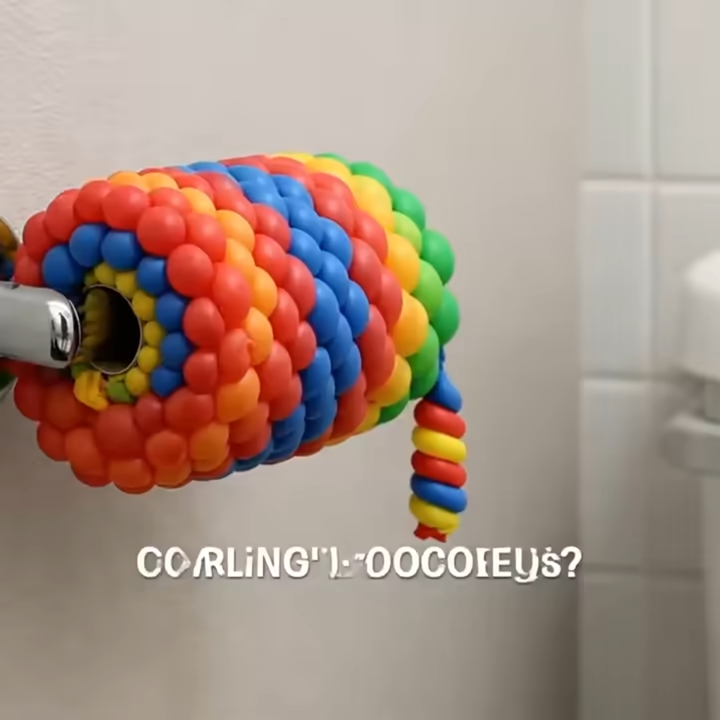
Each clip is:
- Exactly 5 seconds long
- Independent static shot
- Identical bathroom lighting and framing
- Natural bathroom room sound only
- No cuts and no transitions
The result feels like a hyper realistic product demo mixed with surreal ASMR content.
Step 1: Create the Prompt in Focal
Inside Focal, choose Google Veo 3 as your model.
This is the exact prompt used:
Use Google Veo 3 model. Generate 4 separate square 1:1 video clips, each exactly 5 seconds long, rendered as independent static shots with identical framing, lighting, and camera position in a simple modern bathroom. At the start a voice says "Which toilet paper are you using?" A realistic human hand enters from the right side and gently pulls the roll naturally. In each clip, the entire toilet roll must be fully constructed from the specified material forming the complete cylindrical spiral structure itself, including the inner spiral, with absolutely no white tissue, no paper core, no hidden normal toilet paper, and no white layers visible anywhere. The roll must look like the material itself has been tightly wound into a spiral cylinder. Clip 1 the roll is made entirely from tightly packed bright colorful mini balloons forming a dense spiral cylinder, glossy and inflated, stretching slightly and compressing with rubbery resistance when pulled. Clip 2 the roll is made entirely from layered bright yellow banana peels spiraled into a full cylinder, organic texture visible throughout the entire inner spiral, bending and folding naturally when pulled. Clip 3 the roll is made entirely from thin golden brown pita bread layers tightly spiraled into a cylindrical roll, porous bread texture visible all the way through the spiral, flexing and folding softly when pulled. Clip 4 the roll is made entirely from deep red marbled meat slices tightly wound into a spiral cylinder, visible marbling throughout the inner structure, stretching slightly and bending organically when pulled. No dialogue, no music, natural bathroom room sound only, high texture realism, realistic physics, no cuts, no transitions.
Why This Prompt Works
- It defines exact duration and format
- It forces identical framing across clips
- It eliminates hidden white paper layers
- It emphasizes inner spiral realism
- It controls audio environment
- It specifies physics behavior for each material
This level of detail is critical when generating realistic AI bathroom product simulations.
Step 2: Adjust Plan and Custom Settings
After inserting your prompt in Focal:
- Confirm resolution and size
- Set duration to 5 seconds (or how long you prefer it)
- Ensure static camera and no motion
- Double check audio settings are natural room sound only
- Review material clarity and realism emphasis
If needed, refine instructions to improve:
- Spiral density
- Material thickness
- Lighting consistency
- Hand motion realism
Minor refinements can dramatically improve perceived realism.
Step 3: Generate and Review
Click generate.
Focal will call on the selected AI video model and render each clip independently. Review each output carefully:
- Is the inner spiral fully visible
- Are there any white layers or hidden cores
- Does the material behave with realistic resistance
- Is the bathroom lighting consistent
If something looks off, refine the prompt slightly and regenerate.
Step 4: Save Export and Share
Once satisfied:
- Export each clip individually
- Combine for a multi slide TikTok post if desired
- Use the hook as the first clip
- Optimize captions with keywords like AI toilet paper video, realistic material simulation, ASMR bathroom AI, surreal product demo
Consistency and texture realism are what make these videos viral.
Turn Strange Ideas Into Viral AI Content
If you are experimenting with AI product illusions, surreal material swaps, or hyper realistic bathroom scenes, this format is a powerful creative template. By asking a simple question like which toilet paper are you using, you instantly create curiosity, shock value, and replay potential.
With the right prompt structure and the flexibility of an advanced AI video generator like Focal, you can control realism, texture, lighting, and physics in ways that feel almost cinematic.
Create your next surreal product concept today and see how far your imagination can go.
Start creating hyper realistic AI toilet paper videos that stop the scroll and spark curiosity.
Frequently Asked Questions
How do you make an AI toilet paper video that looks realistic?
To make a realistic AI toilet paper video, you must specify material structure, spiral density, lighting consistency, and physics behavior in your prompt. Using advanced models like Google Veo 3 improves texture accuracy and material simulation.
What is the best AI model for material simulation videos?
Google Veo 3 is currently one of the strongest models for high texture realism and controlled physics in short format clips. It performs well for food textures, rubber materials, and layered organic structures.
Why do AI toilet paper videos go viral on TikTok?
They combine shock value, ASMR sound design, hyper realistic rendering, and curiosity driven hooks. The question format such as which toilet paper are you using increases viewer retention.
Can I create multiple AI clips with identical framing?
Yes. By specifying identical framing, static camera, and consistent lighting in your prompt, you can generate multiple independent clips that look like part of the same series.
How do I remove hidden white layers in AI generated rolls?
Be explicit in your prompt. State that there must be no white tissue, no paper core, and no hidden normal toilet paper. Reinforce that the entire spiral structure must be built from the selected material.
📧 Got questions? Email us at [email protected] or click the Support button in the top right corner of the app (you must be logged in). We actually respond.