How To Make ASMR Food Eating Itself Videos With AI (Quick Tutorial)
SMR food eating itself videos are taking over TikTok, YouTube Shorts, and Instagram Reels. From slime fruit slicing to cute dessert mascots chewing with hyperrealistic textures, this niche blends AI video generation, mukbang aesthetics, and satisfying ASMR sound design into one scroll stopping format.
If you are searching for how to make ASMR food eating itself videos with AI, how to create viral AI mukbang clips, or how to generate hyperrealistic dessert characters using text to video models, this guide walks you through the full workflow. You will learn how to prompt correctly, choose the right AI models, control video settings, and export ASMR clips ready for social media.
This tutorial focuses on short form AI generated ASMR dessert videos using chibi style food mascots with commercial lighting, static camera framing, and realistic chewing sounds.
@whisperverse_ai ♬ suara asli - AI ASMR - AI ASMR
Tools You Need To Create AI ASMR Food Videos
To produce high quality AI ASMR food eating videos, you need a platform that can handle prompting, image generation, video generation, and export in one workflow.
This is where Focal comes in.
Focal allows you to:
- Write structured prompts for AI video
- Choose advanced models like Google Veo 3 and Seedance Pro
- Control format such as square 1:1 or vertical 9:16
- Adjust duration, camera style, and realism level
- Generate and refine clips inside one timeline
- Export ready to post social media content
For ASMR dessert mukbang style clips, models like Google Veo 3 are ideal for hyperrealistic textures, lighting control, and subtle material deformation such as jelly stretch, rice compression, and custard jiggle.
Recommended Settings For ASMR Dessert Videos
| Setting | Recommendation |
|---|---|
| Format | Square 1:1 |
| Duration | Exactly 6 seconds per clip |
| Camera | Static, no cuts |
| Audio | Soft ASMR chewing and utensil sounds only |
| Lighting | Soft studio dessert commercial aesthetic |
| Depth of Field | Shallow, subject in focus |
| Tone | Playful, wholesome, non realistic character |
Sample Output Made With AI
Here is the type of content you can generate using one structured master prompt.
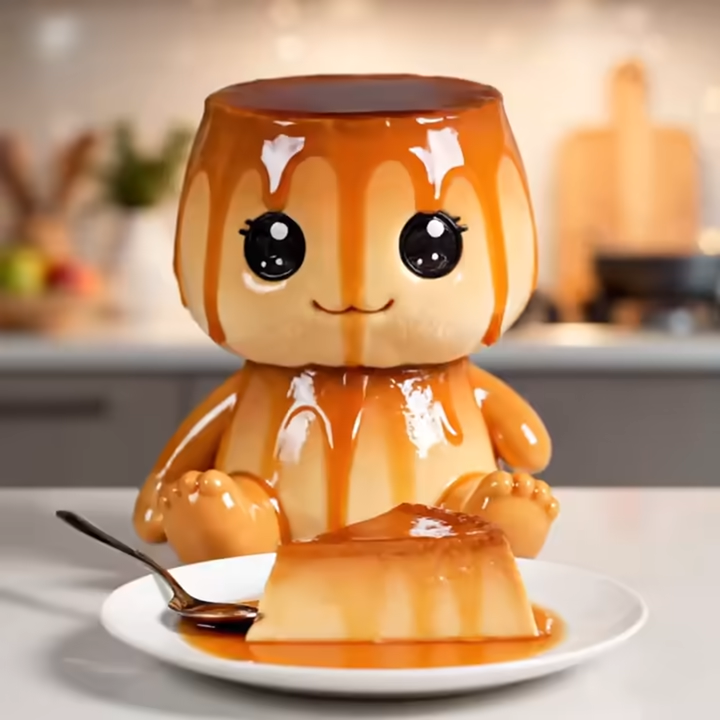
- A glossy caramel leche flan mascot happily eating from a plate with syrup slowly dripping
- A translucent gummy candy character chewing with subtle jelly stretch
- A fluffy marshmallow mascot pulling apart soft pieces before eating
- A stylized sushi character with visible rice grain compression while taking a bite
The result feels like a high end dessert commercial combined with satisfying ASMR content designed for social media engagement.
Step 1: Create Your Prompt Inside Focal
In most cases, the entire workflow is handled inside Focal. You write your structured prompt, choose your AI model, adjust settings if needed, then generate and export.
Below is the exact prompt used for this tutorial.
Use Google Veo 3 model. Generate 4 separate square 1:1 video clips, each exactly 6 seconds long, rendered as independent static shots with no cuts. Each clip features a chibi style dessert mascot character with an oversized head, tiny rounded body, glossy eyes, and plush toy like proportions. The character is clearly fictional and cartoonized, not human. The character is seated on a clean kitchen counter, legs forward, feet visible, posed similarly to how a toddler sits, but clearly a stylized dessert mascot. The body texture is hyperrealistic food material matching the dessert theme. The scene is styled like a high end dessert commercial with soft studio lighting, warm highlights, shallow depth of field, and a clean modern kitchen background. The camera is static in tight mukbang framing, centered on the character and the plate in front of it. The character happily eats a matching dessert from a plate using a spoon or by taking a bite. No self eating. No dialogue. No music. Soft ASMR chewing and utensil sounds only. Maintain hyperrealistic food textures while keeping the character proportions clearly chibi and animated.
Clip 1. A glossy caramel leche flan chibi mascot with jiggly custard texture and shiny caramel glaze, seated on the counter eating a spoonful of leche flan from a plate with syrup dripping slowly.
Clip 2. A translucent colorful gummy candy chibi mascot with bouncy jelly texture, seated on the counter happily chewing a gummy candy piece from a plate with slight candy stretch.
Clip 3. A fluffy marshmallow chibi mascot with soft matte pillowy texture, seated on the counter gently pulling apart and eating a marshmallow piece from a plate.
Clip 4. A stylized sushi chibi mascot made of realistic rice grain detail and glossy seaweed texture, seated on the counter eating a sushi piece from a plate with visible rice compression.
Square 1:1 format, 6 seconds per clip, static camera, dessert commercial aesthetic, high texture realism, playful and wholesome tone.
Step 2: Adjust Video Options And Custom Settings
After pasting your prompt into Focal:
- Select Google Veo 3 or Seedance Pro depending on your desired realism.
- Confirm square 1:1 output format.
- Set duration to exactly 6 seconds per clip.
- Ensure camera motion is disabled for static framing.
- Review audio instructions for ASMR only, no music.
Inside Focal, you can tweak:
- Texture realism level
- Lighting intensity
- Material deformation behavior
- Shot tightness for mukbang framing
- Generation plan before rendering
Step 3: Generate And Refine
Click generate and let the AI model render each clip separately.
After generation:
- Check texture realism on food materials
- Ensure no accidental self eating behavior
- Confirm chewing sounds are soft and satisfying
- Make minor prompt adjustments if needed
- Regenerate specific clips instead of all four
Step 4: Save Export And Share
Once satisfied:
- Export each 6 second clip individually
- Upload to TikTok, YouTube Shorts, or Instagram Reels
- Use hashtags related to AI ASMR, AI mukbang, satisfying food videos, and chibi dessert mascots
- Test different captions for engagement
Short looping square videos perform well in social feeds because they feel seamless and visually satisfying.
Start Creating Viral AI ASMR Dessert Videos Today
AI generated ASMR food eating itself videos combine hyperrealistic textures, stylized characters, and satisfying sound design into one powerful short form format. With structured prompting, proper model selection like Google Veo 3, and controlled video settings, you can consistently generate high quality mukbang style dessert clips.
If you want a streamlined workflow from prompt to final export without juggling multiple tools, this is the fastest way to produce scroll stopping AI ASMR content.
Create your first AI dessert mascot video and see how far you can push realism, texture detail, and playful character design.
Start generating hyperrealistic AI ASMR food videos in minutes with one structured prompt.
Frequently Asked Questions
How do you make ASMR food eating itself videos with AI?
You write a structured prompt describing the character style, food texture, camera setup, lighting, and audio behavior. Then use an advanced AI video model like Google Veo 3 inside a platform that allows format control, duration settings, and export optimization.
What is the best AI model for ASMR food videos?
Models with strong material realism and motion control perform best. Google Veo 3 is ideal for hyperrealistic food textures such as jelly stretch, syrup drip, rice compression, and subtle chewing deformation.
Can AI generate realistic mukbang style chewing sounds?
Yes. By explicitly instructing the model to include soft ASMR chewing and utensil sounds only, you can avoid background music and dialogue while keeping immersive sound design.
What format works best for viral AI ASMR clips?
Square 1:1 and vertical 9:16 formats work best for TikTok and Shorts. Six to ten second looping clips with static framing and tight composition tend to perform well.
How do you make AI food characters look cute but not human?
Use terms like chibi style, oversized head, plush toy proportions, glossy eyes, and clearly fictional mascot. Also specify non human and cartoonized to prevent realistic human output.
📧 Got questions? Email us at [email protected] or click the Support button in the top right corner of the app you must be logged in. We actually respond.